Skip to content

Math Animation Software:AI Math Explainer Videos

Math animation software can make an abstract idea visible. Describe the relationship you want to explain, then preview a short animation in your browser. When the Math option is available, start with that template; otherwise, use the scene-based generator below to draft a visual lesson.

Try

Watch a math animation

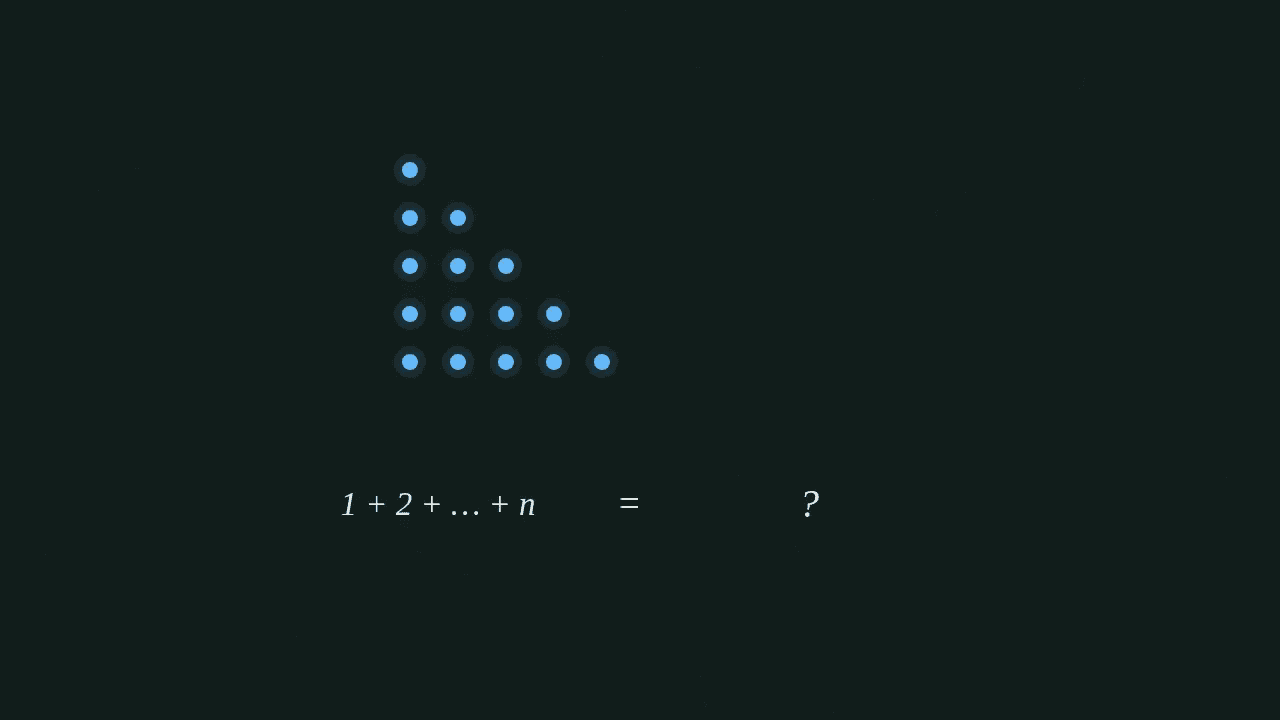
This prepared example is rendered live on your device: two staircases of dots combine into a rectangle to explain the sum of 1 through n. Load the silent sample, press Play, or scrub through it. It demonstrates the Math template; the scene-based fallback has a different look.

A staircase of dots beside the sum 1 + 2 + … + n.

How to make math animations

Start with a concept and a viewer, rather than a whole chapter. The Math template turns your prompt into a short animation with moving diagrams. Generation requires an account and credits. If the template selector is absent, the existing generator offers script review and scene-based drawing instead; it does not promise the same continuous mathematical motion.

  1. Step 1: Describe one relationship

    Name the concept, the audience and what should move. A topic or a short explanatory script can guide the Math template. It interprets your brief; it does not guarantee word-for-word narration.

  2. Step 2: Generate and inspect

    Confirm credit use to generate. The browser checks sample frames and can request up to two paid repair attempts under that consent. Watch the result and verify the mathematics yourself; automated checks assess rendering, not whether a proof is correct.

  3. Step 3: Export on your device

    Play, pause and seek to review the animation, then export a silent 1280 × 720 MP4 in a browser with H.264 encoding support. Keep the page open and in the foreground until the download is ready.

What you can animate

A useful math explainer connects a symbol to something the viewer can track. The drawing tools include axes, curves, arrows and text labels. Ask for a clear visual relationship and review the generated result: a supported drawing primitive is not a guarantee that every requested diagram will be correct.

Functions and derivatives

Use a plotted curve, a moving point and a tangent to explain a local rate of change. Keep the domain and scale explicit in your prompt. Pause the preview at several positions to check that the tangent and numerical labels agree with the function.

Vectors and transformations

Use arrows and a grid to show direction, scaling or a change of basis. A prompt such as “stretch the horizontal basis vector by two while keeping the vertical vector fixed” gives a more concrete target than “explain linear algebra.”

Geometry and probability

Request a triangle, a changing area, or a simple collection of outcomes. These are possible diagram subjects, not separate ready-made sample films. Supply the values and reasoning you need, then check labels, proportions and conclusions before using the result in a lesson.

Choosing math animation software

If you are comparing Manim alternatives, decide how much control you need over each construction. This tool accepts a natural-language brief and renders its generated drawing instructions in the browser. It does not run Manim, import Python scenes or provide a mathematical animation library for you to program against.

Your priorityWhat this workflow offersWhat to check first
Start from a topicDescribe the diagram without writing animation code.Generation can misinterpret the brief; inspect the result.
Review movementPlay, pause and seek within the generated animation.There is no element editor or editable director sheet for Math films.
Share a videoExport silent 720p landscape MP4 on your device.The browser needs H.264 encoding; keep the page open.
Control every detailUse a precise brief with values, labels and a single visual goal.This is not a substitute for a manually authored proof or a code editor.

Searches for “Manim online” and “3Blue1Brown style” often express a wish for clear visual reasoning without a local coding setup. The Math template uses a dark board with colored diagrams, but it is not affiliated with those projects and does not reproduce an individual creator’s videos. Choose it for the workflow you can inspect here, rather than a promised imitation.

For lessons and educational videos

Teachers and tutors

Build one visual explanation for a difficult transition: a secant becoming a tangent, or a vector changing length. Pause the clip in class and ask students to predict the next frame. Check the axes, units and intermediate steps against your lesson notes before showing it.

YouTube educators

Use a short silent animation as a visual segment in a longer lesson. The Math export has no generated voice track, so add your narration in your usual video editor if needed. The landscape frame suits a standard lesson video; automatic vertical reframing is not part of this template.

For a broader topic, try the AI explainer video maker. For a hand drawing scenes, use whiteboard animation. For a character-led explanation, visit the stickman explainer video generator.

Write a brief you can verify

State the learning goal first, then the visual change. Specify a function or a small set of values, and say which labels should stay visible. Avoid packing several theorems into one short clip. After generation, scrub through the result at the start, middle and end to check that the intended relationship holds throughout.

  • “Explain the derivative of x² to a first-year calculus student. Move a point from x = 1 to x = 3 and show the tangent.”
  • “Show a vector doubling in length while its direction stays fixed. Keep the origin visible.”
  • “Explain slope using a rise of two and a run of one. Label both distances before displaying the ratio.”

AI math video generation is a drafting aid, not a proof checker or an answer engine. A convincing motion can still illustrate the wrong formula. If a label is wrong or a step is missing, revise the brief and generate again, accounting for the credits each new request uses.

Preview first, generate with credits

You can watch the sample without generating a new video. Math generation and any automatic repair attempts use credits after explicit consent. Each operation reserves an estimate, charges actual usage up to that reservation and releases the unused portion. Exporting the finished animation happens in your browser and does not make another AI request.

See pricing and available plans for current credit packages. Free script allowances belong to the scene-based script-writing workflow; they are not free Math film generations. A generated film may still need review even when its automatic rendering checks pass.

FAQ

How do I make math animations without coding?

When the Math option is available, describe one concept, choose that template and confirm credit use. Review the generated preview, then export. You do not need to install Python or write Manim code. When Math is unavailable, the form uses the existing scene-based generator instead.

Is this a Manim alternative that works online?

It offers a browser workflow for making short visual explanations from a prompt. It does not execute Manim or import its projects. The Math template generates drawing instructions that play and export on your device; it is best evaluated using the sample and the controls on this page.

Can AI make a math explainer video from my script?

You can paste a short script as the brief for the Math template. It guides the generated visuals and labels, but the film has no voiceover and does not promise word-for-word reproduction. Use the scene-based generator if you need its script review and narration workflow.

What should teachers check in a generated math animation?

Check the function, scale, labels, units and each reasoning step against your lesson. The automatic checks look for rendering issues such as blank frames and small text. They cannot establish mathematical correctness or replace a teacher’s review.

Can I export a math animation as MP4 for YouTube?

Yes. Math films export as silent 1280 × 720 landscape MP4 files in browsers with H.264 encoding support, such as recent Chrome or Edge. Keep the page open and in the foreground until export finishes, then download the file and add any narration in your video editor.

Does the Math template support LaTeX formulas?

It draws text labels and mathematical diagrams, but it has no LaTeX typesetting engine. Simple notation can appear as text; complex formula layout is not guaranteed. Review every expression in the preview before sharing the video.

Show one idea moving

Start with a curve, a vector or a relationship your audience finds hard to picture.

Try a math explanation